Understanding HTML Tags and Elements

I'm a passionate Full Stack Developer who loves turning ideas into real-world digital solutions. With a strong foundation in both frontend and backend technologies, I build fast, scalable, and user-focused web apps using modern stacks like:
Frontend: React.js, Next.js, Tailwind CSS Backend: Node.js, Express.js, Firebase, Prisma Databases: MongoDB, PostgreSQL Deployment & Tools: Vercel, Git, GitHub, Third-party API integrations 🔥 Whether it’s writing clean UI, building robust backend APIs, or deploying full-stack apps – I enjoy every part of the development process.
📬 Open to internships, remote opportunities, collaborations, and tech talks. Let’s connect and build something amazing together!
Introduction
HTML (Hyper Text Markup language) is Not a programming language.
HTML is markup language which means It describes the structure and organize the content of the webpage. It does not take any decisions , or run the logic and perform calculations.
Why was the HTML created and why do we use it ?
HTML was created to solve a document-sharing problem, not a “computer intelligence” problem.
Early networks needed a way to share documents that would work on any computer, any OS, any screen.
Plain text could show words but could not preserve meaning like titles, paragraphs, or references.
HTML introduced markup so documents could describe what content is, not how it looks.
This allowed browsers to understand structure, importance, and relationships inside a document.
Because HTML is text-based, it is human-readable, long-lasting, and platform-independent.
Browsers convert HTML into a structured tree (DOM) that other systems can work with.
CSS uses this structure to style content, and JavaScript uses it to add behavior.
Search engines, screen readers, and printers also rely on this structure.
Without HTML, the web could not be searchable, accessible, or scalable.
HTML is the foundation contract of the web, not a UI tool.
How do we write the HTML ?
We write HTML with the help of the tag , means we does’nt write direct english , we write HTML with the help tags like this < > < / >.
Syntax :
<tagname>content</tagname>
Examples :
<p>Hello</p>
<h1>Title</h1>
Types of Tags :-
Opening and Closing Tags :
<p> → Opening Tag
</p> → Closing TagEverything in between is the content.
These are used when an element needs to wrap content and give it meaning
(like paragraphs, headings, divs, links).<p>This is text</p>Self-Closing (Void) Tags :
Some elements do not wrap any content, so they don’t need a closing tag.<img src="photo.jpg"> <br> <input>hey exist to insert something, not describe text:
img→ inserts an imagebr→ inserts a line breakinput→ inserts a form control
Many People thinks that Tag and elements , wrong Tag and elements are two different things
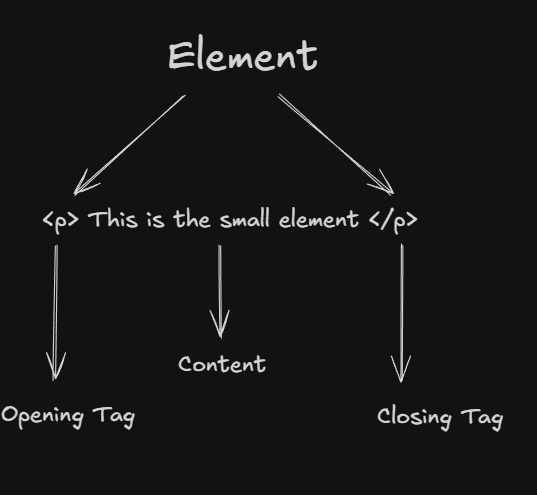
For example :
<p class="intro">Hello</p>
An HTML Element includes:
Opening tag
Content
Closing tag
Attributes (if any)
This is the whole one HTML element.
What are Block and Inline Elements in HTML ?
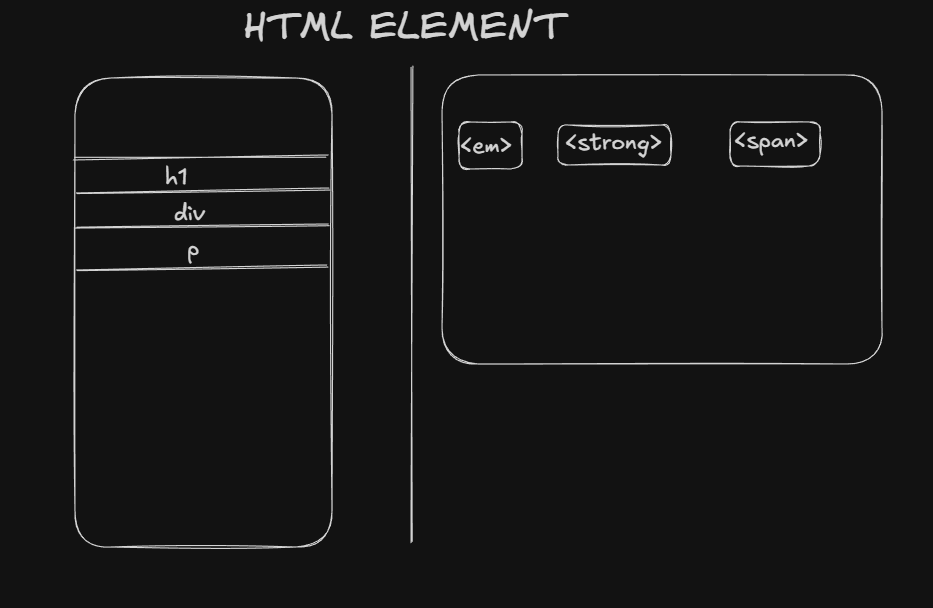
Block elements:
Start on a new line
Take full width
Stack vertically
<div></div>
<p></p>
<h1></h1>
<section></section>
Use block elements for: Layout , Structure , Sections
Inline Elements :
Stay in the same line
Take only required width
<span></span>
<a></a>
<strong></strong>
<img>
Use inline elements for: Styling text , Links , Small components
Conclusion :
HTML is not just the first thing people learn in web development , it is the base layer of the web itself. Every website, framework, and tool ultimately depends on the structure HTML provides. Understanding HTML properly means understanding how the web thinks, not just how it looks. When you know why HTML exists and how it works conceptually, CSS and JavaScript stop feeling confusing and start feeling logical. Strong fundamentals in HTML don’t make you slower , they make you future-proof.


