Git for Beginners : Basic and Essential Commands
I'm a passionate Full Stack Developer who loves turning ideas into real-world digital solutions. With a strong foundation in both frontend and backend technologies, I build fast, scalable, and user-focused web apps using modern stacks like:
Frontend: React.js, Next.js, Tailwind CSS Backend: Node.js, Express.js, Firebase, Prisma Databases: MongoDB, PostgreSQL Deployment & Tools: Vercel, Git, GitHub, Third-party API integrations 🔥 Whether it’s writing clean UI, building robust backend APIs, or deploying full-stack apps – I enjoy every part of the development process.
📬 Open to internships, remote opportunities, collaborations, and tech talks. Let’s connect and build something amazing together!
Before Learning What is GIT ? We’ll Learn Why GIT is used ?
First Understand it simple and easy language , The reason we use Git is so that we can track the changes made to our codebases.
How GIT was released in the market, and who created it?
We all the know about linux kernel , The Linux kernel is a very large project, so its codebase will also be large. Before the creation of Git , linux developers are using Bit Keeper .Bit keeper is another tool before the creation of GIT to track the changes of the codebases which linux developers are using , Bit Keeper is proprietary but linux developers were allowed to use it for free under a special license.
So as per the Bit Keeper , Linux developers are anlyazing there network network protocol and Bit Keeper’s company Bit mover called it reverse-engineering and that violed there license.
Bit mover tells them you are trying to reverse-engineering our tool , We will remove your free licenses and offered paid License instead. After that the linux team decide to create there own tool like bit keeper so that they have full ownership of the tool and they can do what ever they want.
With in a two week , Linux team made there Own tool , GIT which is used to track the changes of the codebases.
GIT is reaction to failure , not a classroom invention.
Now , What is GIT ?
Git is a distributed version control system that records the history of the your previous code as immutable snapshots , allowing safe experimentation , collaboration and rollback without losing work.
Yes , We can say that Git is the Tracker of our code.
With Git , Every changes is tracked.
You can go back to any moment where the code is left last time.
You can compare versions.
You can undo mistakes safely.
Multiple developers can work on the single code base.
Now we will learn where the Git is used and How we used it ?
Git is used in a repository means A repository is a project that GIT is tracking.
There are two types of repository
Local Repository → Which Means your own machine.
Remote Repository → Which Means Your codebase is now on some server online .
Example : Github / Bitbucket / Gitlab etc..
How Git is used in the repository ?
First , there are some common commands to use GIT
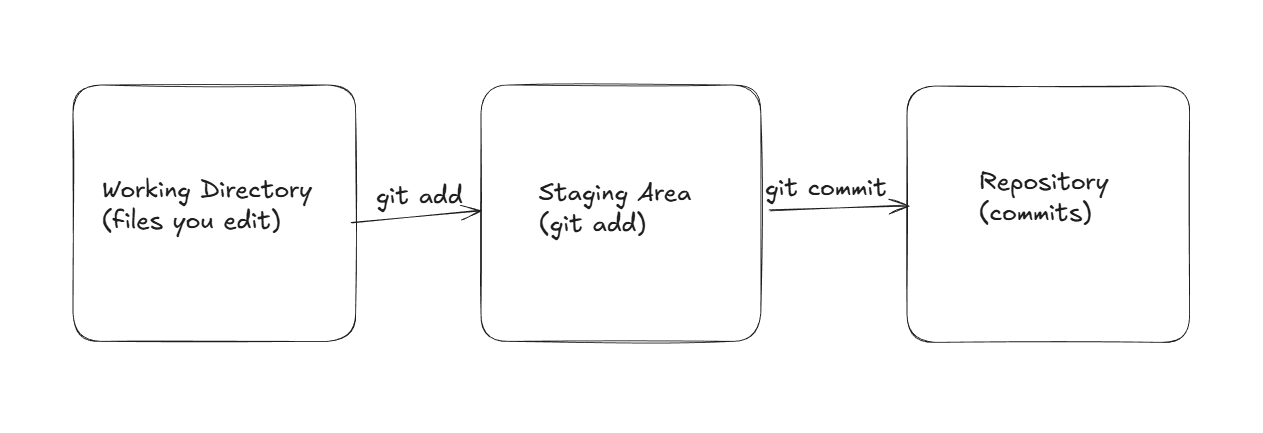
git init
It’s works is to intialize the repositary to the git. After Intialization the repository have .git folder inside it under the hood
git add <filename>
It’s works is to mark the changes of the file in which the code is changed or refactor or something update in that file and send it to the staging area.
git commit -m “commit-message“
It’s work is to snapshot of the changes file at a current point of time.
Each Commit contains : Author - who did this commit , Timestamp : What is the time of this commit , Commit Message : Gives the commit message what changes are done and what new is added ,
Reference to the parents commit also .
git log
It’s works is only to get the history of the commits.
git diff
Tells , what is modified in the file/inside the file.
git status
Tell which file is modified in the files.
git branch
Branch is a moveable pointer to a commit
When your codebase is in the remote repository,
So there are branches for example : If your code base is in the server , There is one default main branch which is the responsible for the final output of your project.
Every Developer have there own branch to fix issues or update any feature and we can name the branch according to it’s fixes and features updating.
git revert <previous hash - current hash>
It’s works llike this - If someone commit the bug commit or wrong commit in the code file , So how we can fix it direclty with command ?
it can solve with the Git revert makes a new commit , that is before the bug commit.
It does not delete or remove commits from history. It adds a new commit to reverse the changes.
Another command to get the lastest commit you want by reversing the changes is :
git reset
It Means, We will take the HEAD pointer to the lastest commit that you want.
Some more Jargons which are for beginners
HEAD - It is pointer which means this is where are you currently in the commit history.
Normally, What is your latest commit , your HEAD pointer will be on that commit .
HASH - It is basically the commit Id , that is given by the git automatically to know the difference between lastest commit and it previous commit


